Fragment Assembly
The Fragment Assembly module reconstructs candidate CGRs using the provided rearrangement breakpoints.

Inputs
The input files for this module must include the following:
A tumor Hi-C sample in mcool or cool format.
A breakpoint file, which contains multiple simple rearrangement events, is formatted as follows:
head K562_chr18_breakpoint.txt
chr18       450000  chr18   21900000
chr18       450000  chr18   3450000
chr18       3450000 chr18   10850000
chr18       7450000 chr18   25900000
chr18       8100000 chr18   23700000
Guideline
Step 1: Load Tumor Sample
Click Tumor Sample, select the tumor Hi-C file, and click Load to import the file.
Step 2: Select Resolution
Once the file is loaded, choose the desired resolution from the Resolution dropdown menu.
Step 3: Load Breakpoint File
Click Breakpoint File to select a file containing simple rearrangement breakpoints.
Step 4: CNV normalization (To obtain more accurate fragments)
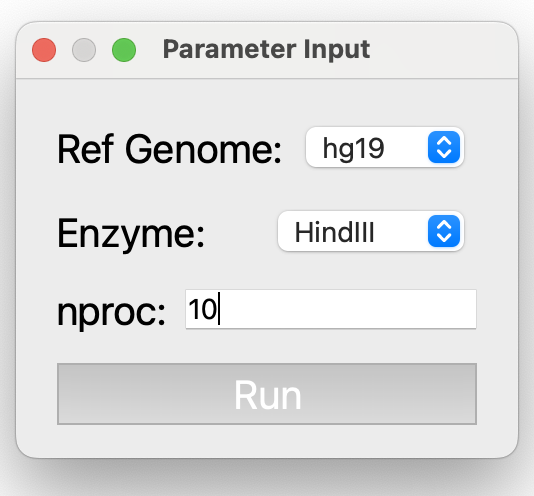
Click CNV Normalization. In the popup window, select the reference genome and enzyme for the Hi-C sample. Adjust nproc according to the available computational.
Parameter Descriptions (for detailed information, see NeoLoopFinder):
Ref Genome: The reference genome used for mapping the Hi-C data. Supported genomes include: hg38, hg19, mm10, and mm9.
Enzyme: The restriction enzyme used in the Hi-C experiment. Supported enzymes include: HindIII, MboI, DpnII, BglII, Arima, and uniform. Use uniform if the genome was digested with a sequence-independent or uniformly cutting enzyme.
nproc: The number of processing threads to use, specified as an integer (e.g., 10).
Step 5: Run Fragment Assembly
Click Fragment Assembly to generate and view the assembled complex rearrangements. The results will be displayed on the right side of the interface as well as in the The result of assembled CGRs box.
To reinitialize the module, click Reset.
Output
